ZOHO CRMのAPIv2があまりに分からずに苦労した話 の続編です
phpにて、composerでインストールしたファイルを直接いじるというのはどう考えてもおかしいため、方法があるのではないかと探ってみました。
前回チャレンジした内容を真っ向から否定して実施です。
- ZOHO専用のDBは使わない
- composerには触れない
実は簡単にできましたが、気づきに時間がかかってしまいました。
実際に使えたコードをメモしておきます。
$configuration = [
            "client_id"              => "1000.example.example.example",
            "client_secret"          => "1234567890.example.example.example",
            "redirect_uri"           => "http://example.com",
            "currentUserEmail"       => "info@example.com",
            "applicationLogFilePath" => ROOT . DS . "logs",
            "token_persistence_path" => ROOT . DS . 'data',
        ];
        \ZCRMRestClient::initialize($configuration);
		set_include_path(\ZCRMConfigUtil::getConfigValue('applicationLogFilePath'));
        $oAuthClient = \ZohoOAuth::getClientInstance();
        $grantToken  ="1000.example.example.example.example.example";
        $oAuthTokens = $oAuthClient->generateAccessToken($grantToken);
        var_dump($oAuthTokens);
上記のtoken_persistence_pathで指定することで、これまでZOHO専用DBに格納した内容をテキストに書き出して利用することができるようにするものです。
パス指定は、最後のスラッシュはつけても付けなくても補完してくれます。
予め、上記のtoken_persistence_pathにzcrm_oauthtokens.txtというファイルを作って置く必要があります
また、上記のgrantTokenについても注意が必要です。
https://accounts.zoho.com/developerconsole
にて
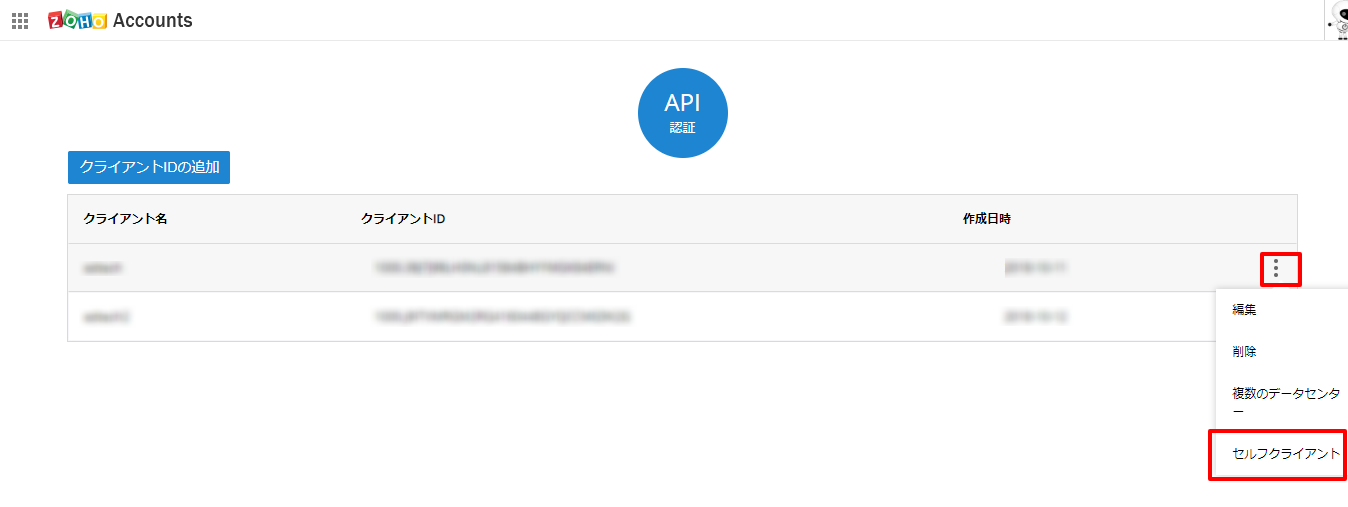
こちらの3ドットのところから、「セルフクライアント」をクリックします。
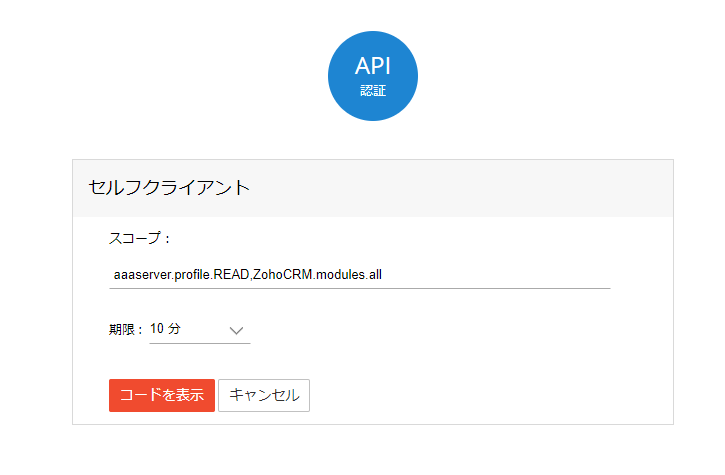
スコープは全権限を与えて良ければ以下とします
ZohoCRM.users.ALL,ZohoCRM.org.ALL,ZohoCRM.settings.all,ZohoCRM.settings.roles.ALL,ZohoCRM.settings.profiles.ALL,ZohoCRM.modules.all,ZohoCRM.settings.variables.ALL,ZohoCRM.modules.notes.ALL,ZohoCRM.bulk.ALL,ZohoCRM.settings.modules.ALL,ZohoCRM.notifications.ALL,ZohoCRM.coql.READ
10分を指定して、上記プログラムにアクセスします
終わり。